mobile payment image

01.  project description

MyHealth

A patient-centred solution designed to empower patients as experts in their healthcare

This project was conducted as part of the project requirement for a Design Thinking course. Alongside two other classmates, we worked with PFAs (Patient Family Advisors) who were spokesmen of patients at the St Joseph hospitals but also, had themselves been patients before. I was responsible for designing the web interface and testing.
02.  project info

Role

UI Design, User Testing, User Interviews, Research

Timeline

October 2022 - November 2022

Team

Christopher Leroux,

Vincent Magcalas

03.  the challenge

Patients wanted to feel like experts in their healthcare but did not feel like a part of their healthcare journey.

The current healthcare system is challenging for most patients particularly those undergoing a medical procedure or health challenge. Speaking to patients, they highlighted some current challenges they had experienced in the past with healthcare which has caused a lack of trust in the healthcare. From the interviews, here are some of the challenges we discovered patients have with the current health care system:

  • Lack of aftercare summary piece - patients want to know what was discusses during their doctor visits especially for intense visits where they get overloaded with information that is ahrd for them to retain.
  • Language barrier - speaking to the PFAs, a lot of international patients find it hard to communicate in english and worse, comprehend English written texts. This makes it hard for them to make proper use of available health tools
  • Silo system of hospital - speaking to the PFAs, we discovered that the hospital system works in silos. Consequently, the entire care team of a patient aren’t well-informed of patient’s progress some times. Also, there is no way to share patient’s medical history if perhaps a patient moves to a new city
  • Patients aren’t made to feel like a part of the process - patients show resistance in seeking medical care because of the communication gap in the health system; doctor’s communicating with them in medical terminologies which half the time, they do not understand. This atimes, prevent them from continually seeking help as they don’t feel empathized with.

04.  the goal

Re-imagine the patient health learning experience going through a knee replacement surgery

The goal was to brainstorm ideas and design solutions that could help patients be more knowledgeable about their care when going through a surgery.

05.   the solution

MyHealth

My health is a web platform providing users with information relating to their health conditions so that they are well-informed every step of the way and can help manage anxiety of the unknown while preparing for surgery. The features include:

  • Medical notes - a comprehensive aftercare summary notes detailing what was discussed during a doctor’s appointment/visit
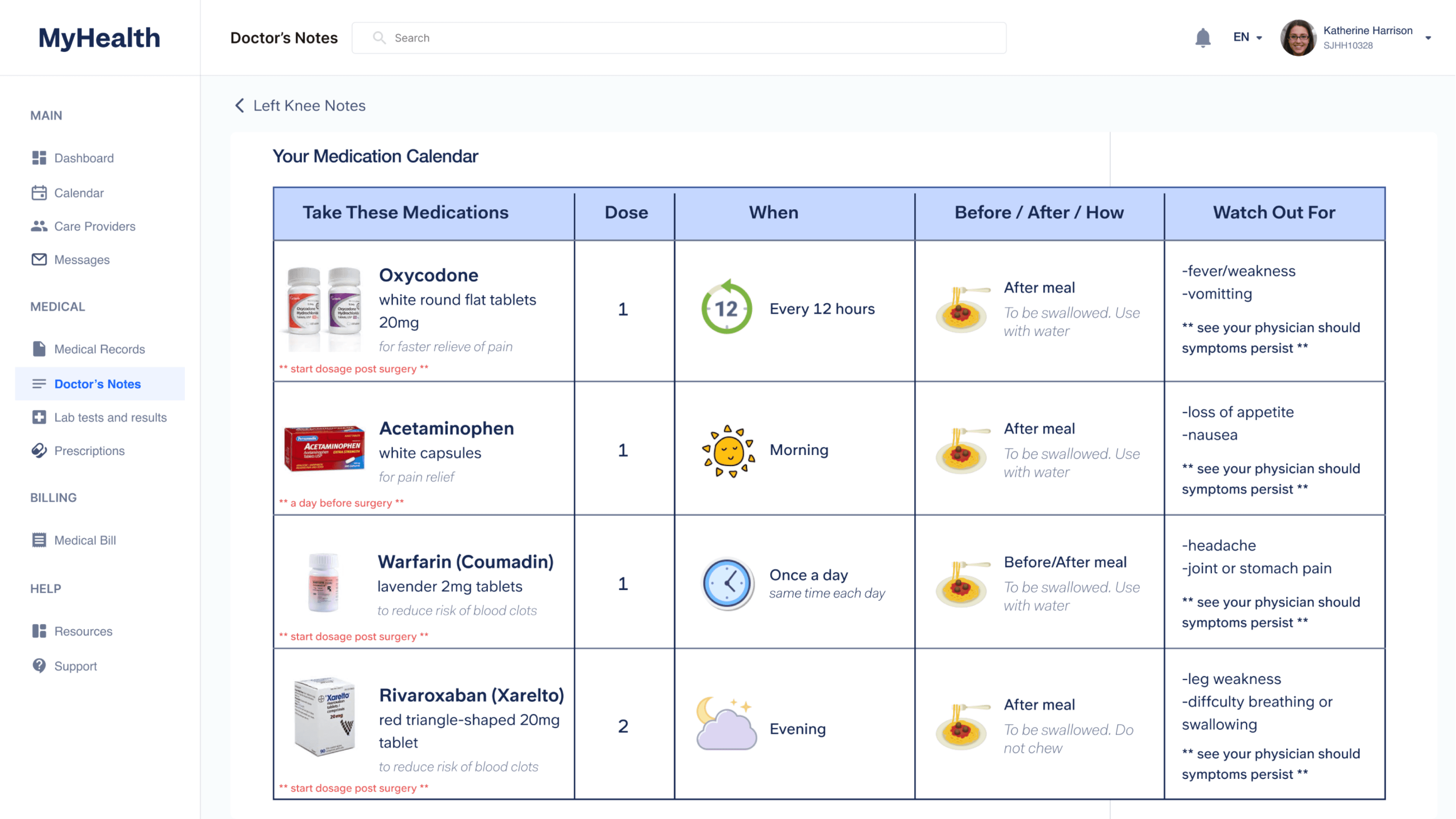
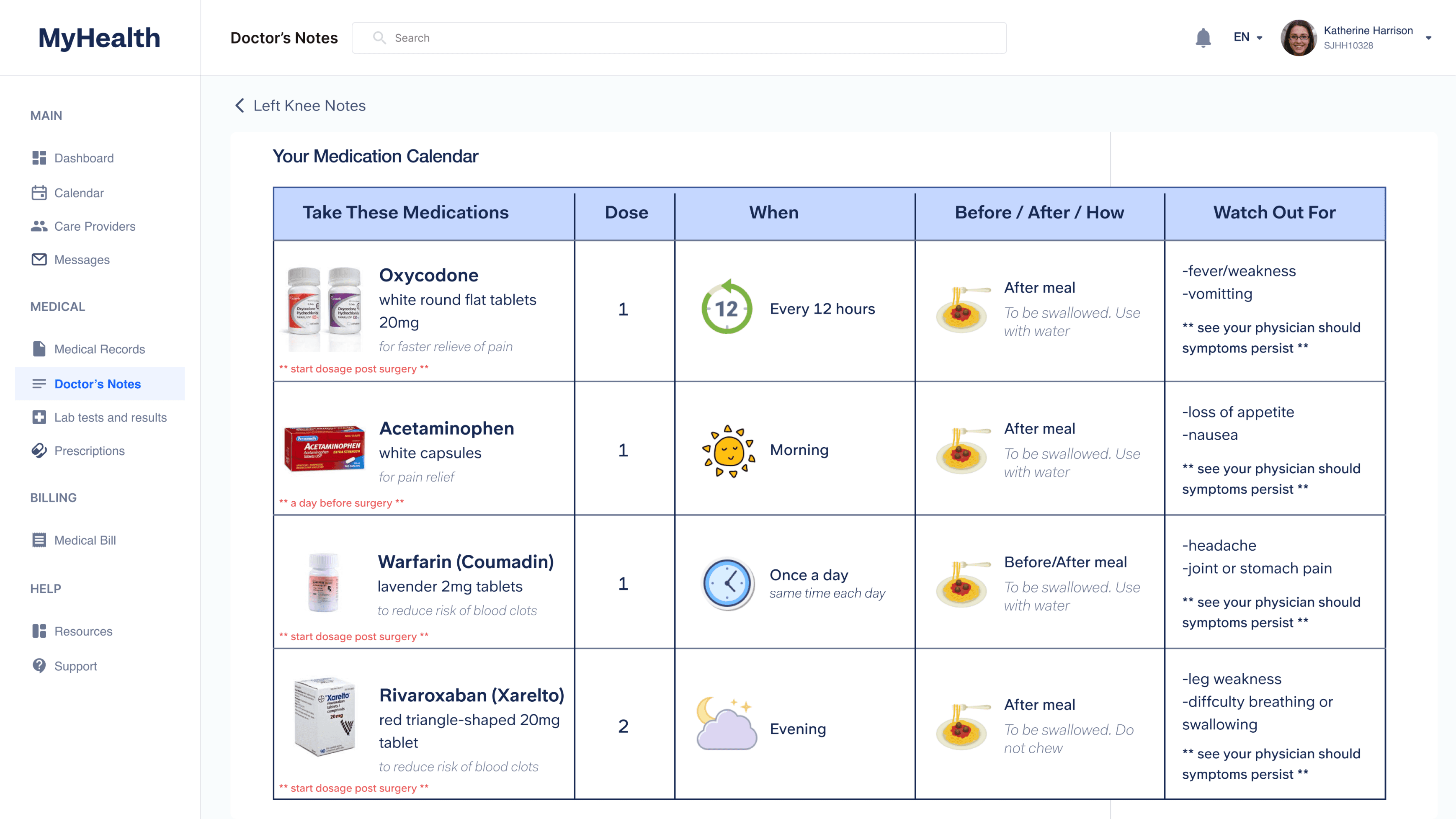
  • Medication calendar - A visual calendar detailing when and how prescribed medications should be used as well as symptoms or signs patients should watch out for
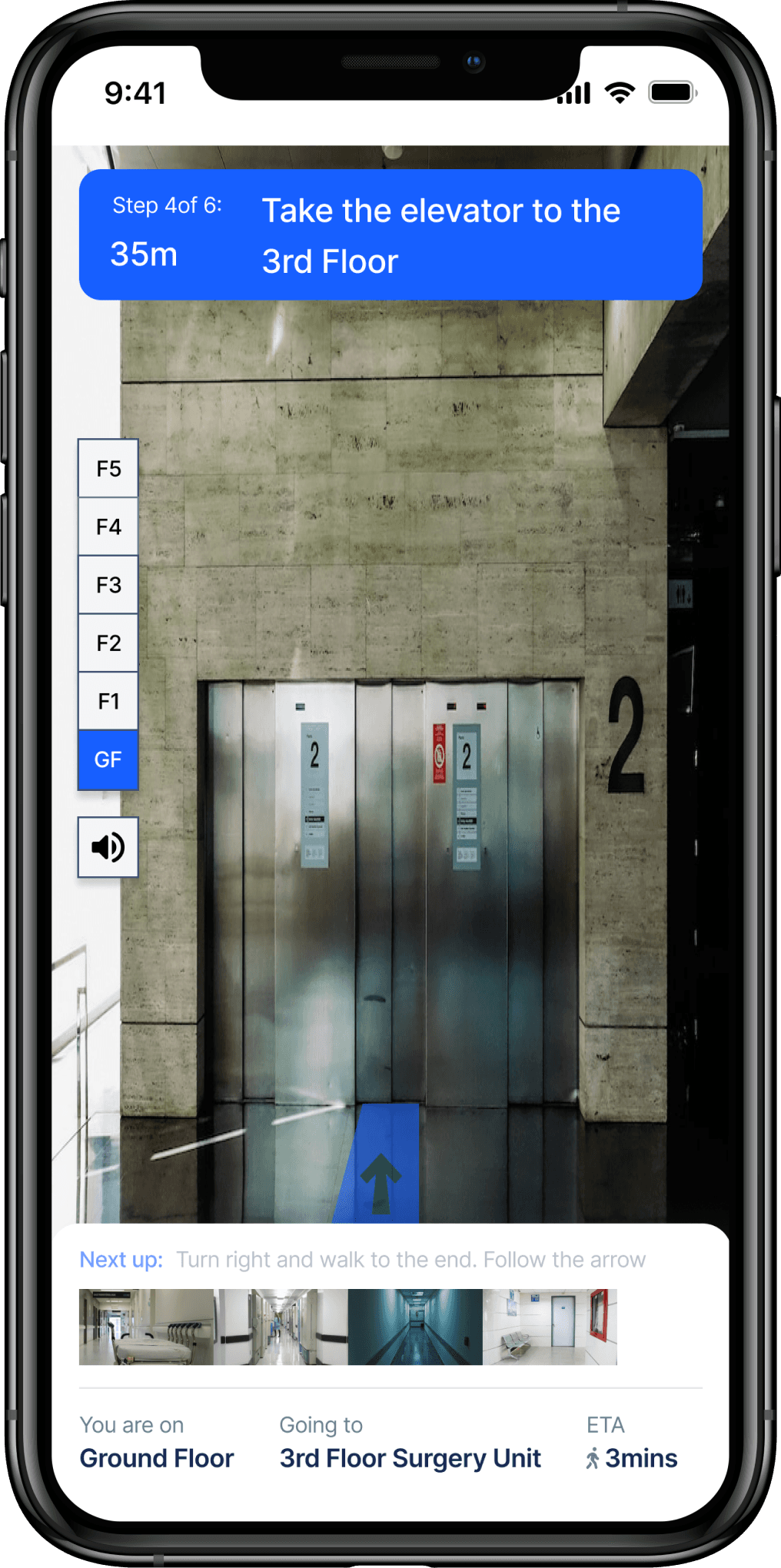
  • AR Interactive WayFinding Indoor Map - an interactive indoor map to help alleviate the stress of the surgery day by helping patients find their way around the hospital whether they are going in for a surgery or running late for a doctor’s appointment.
dashboarddashboard one

06.  hear their stories

Remote Interviews to Empathize with Patients

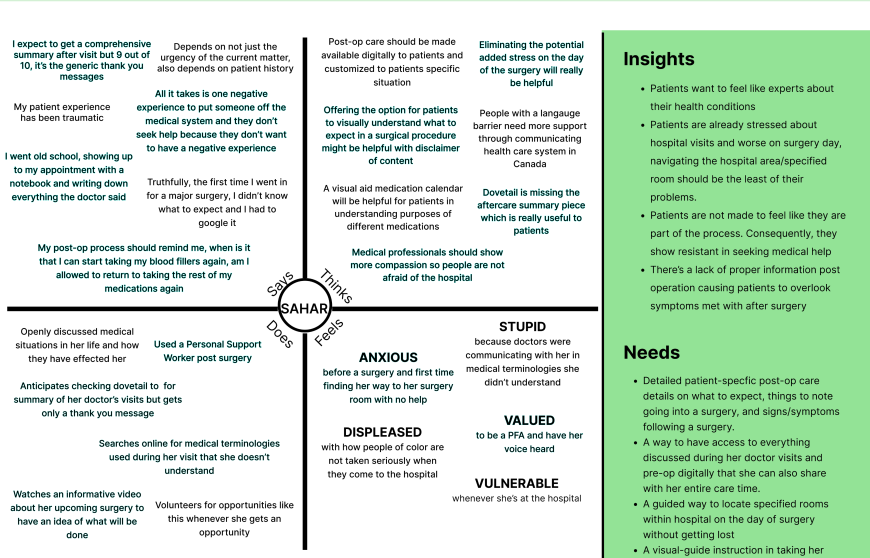
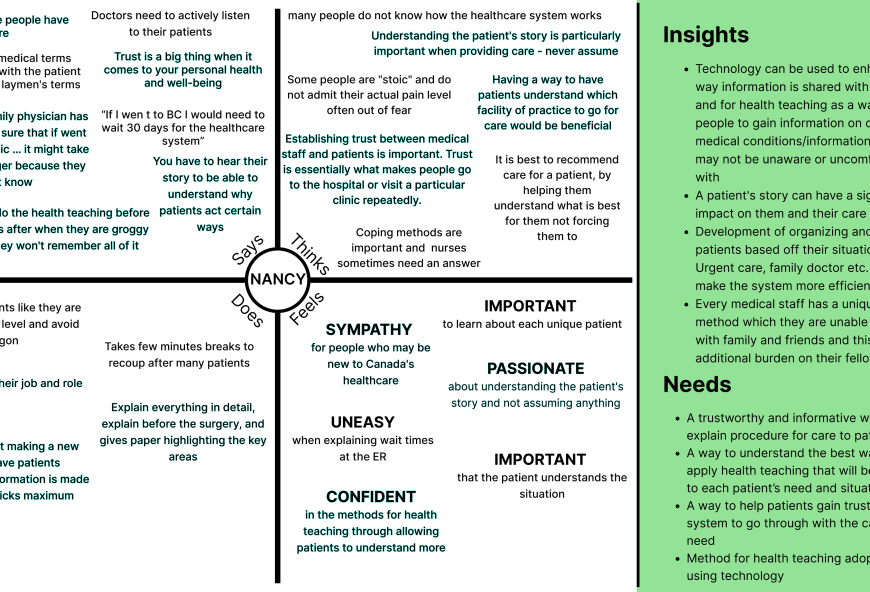
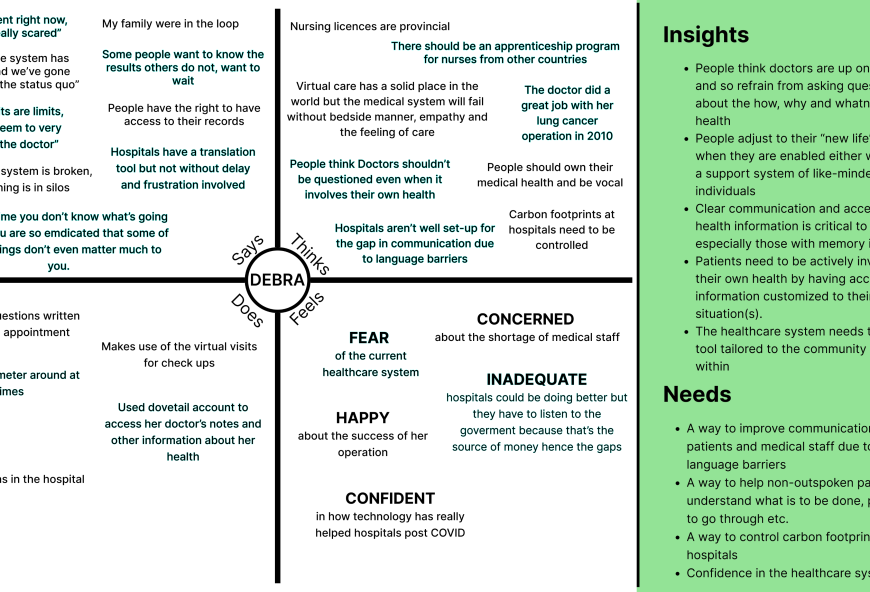
We sort out to get an in-depth understanding of the current end-to-end user experience with the healthcare system in Canada, the services and health tools available to them. We interviewed a total of 7 users and eventually narrowed down to 3 major users whose pain points we were trying to solve for.

06.1.   key points from user interviews

User Interviews and Quotes using Empathy Map

We spoke to a total of 7 patients. Here are some of the key insights gotten from 3 of the patients. We organised the information using Empathy Map.

empathy map oneempathy map twoempathy map three

07.  insights

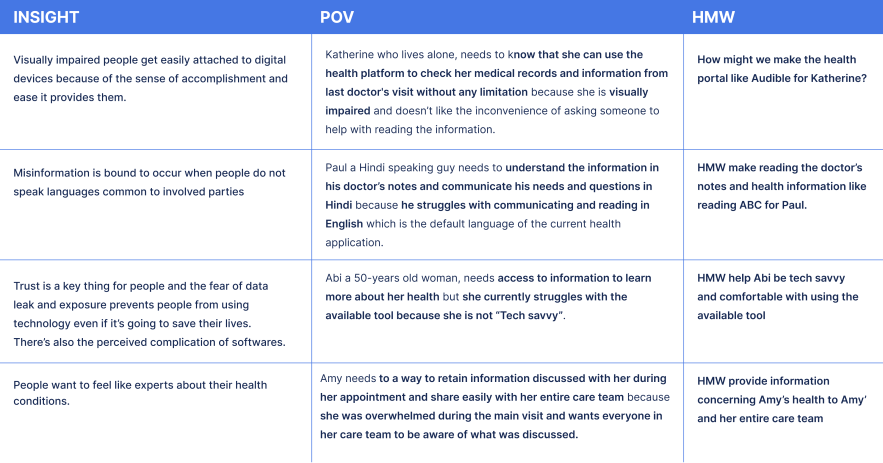
Findings & Insights Uncovered Categorised into Themes

After speaking to patients, we synthesised the information gathered and categorised them using themes to help dig deeper into the identified challenges.

number

Theme: Information dearth

  • There is a heightened sense of anxiety going into and coming out of surgery and half the time patients are not well-informed as to what to expect before and after.
  • Patients are met with a lot of signs and symptoms post-op which often times they overlook due to lack of proper information post operation.
  • Patients want to be expert in their own medical condition to help them feel more like a part of the process in their health procedures(e.g surgeries).
number

Theme: Communication gap

  • Patients want access to tools customized to their needs and situation(s).
  • In the medical environment there are communication gaps that exist between staff and caregivers due to changeovers in shifts leaving a lot of information not communicated.
  • People go to where there is an abundance of like-minded individuals like them. Hence patients are sometimes hesitant to go to clinics if there is uncertainty about if they will be able to communicate easily with the doctors or nurses.
number

Theme: Healthcare distrust

  • Patients think doctors are on a pedestal and should not be questioned even when it involves their health.
  • Patients are not made to feel like they are part of the process. Consequently, they show resistance to seeking medical help.
  • Some people are 'stoic' and do not admit their actual pain level often out of fear or feeling of seeming overly dramatic to the doctors because unless the hospital has collected enough records on a patient, they do not believe the patient’s issue is as serious as they make out.

08.  market research

Defining our target audience

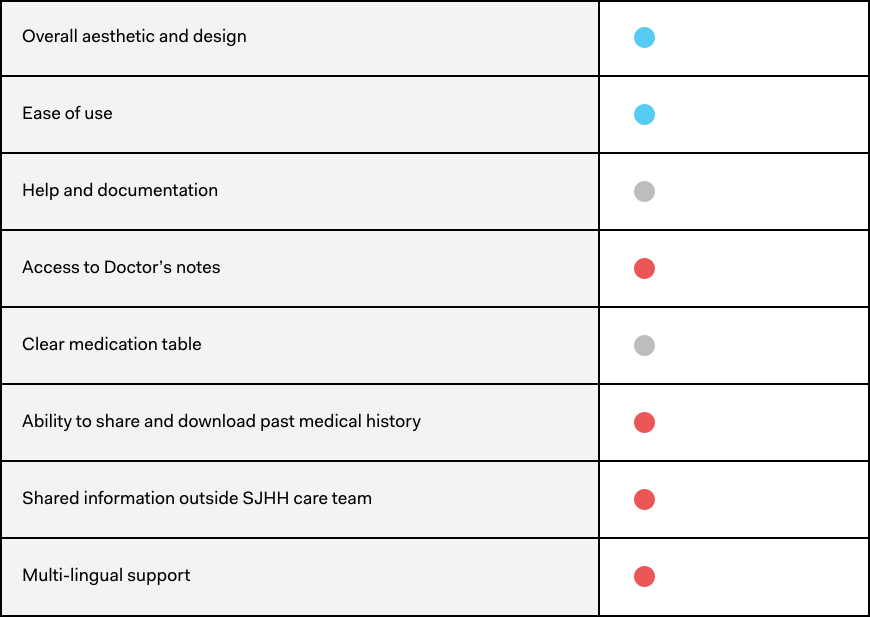
Heuristic Evaluation & Analysis of Dovetale

Dovetale is a secure online portal for patients from which they can manage information related to their health and access medical records. It is a portal developed by St Joseph’s Healthcare Hamilton. Most of the patients we spoke were already using this for managing their health information but felt the application could be doing more for them. Hence, I did a heuristic evaluation of the system to identify gaps and opportunity areas for our solution. Conducted a heuristic evaluation of the website specifically in terms of aesthetic and design, functionality for patients, help and documentation, and navigation. Also analyzed its strengths and weaknesses.

legendevaluation result

09.  create phase

Defining the problem

User Persona

Having spoken to some patients, to get into more specifics and further identify the need space based off our interviews, we defined two personas considering both the mainstream users and extreme users.

user
quote

I am my most vulnerable in the hospital and I need my care team to speak to me in a way that I understand. I should not be made to feel stupid

Esther Cooke - mainstream user

Age: 35; Location:Canada; Status: Married; Language: Hindi;

BIO

Esther is a 39years old woman with a long history of medical conditions. She moves locations often so she has different Physicians. She recently had stroke which has affected her memory. Due to this, she sometimes forgets what the doctor mentioned during her last visit and sometimes forgets the medication dose. To help with this, she sometimes writes down her questions but during the after care, the doctors speak to her in medical terminologies and after the appointment, she goes home with no report from the hospital as to what was dicussed inn the appointment. She also has no way of keeping all her physicians in the loop which causes misinformation.

Needs

  • Needs to feel like she is part of the process more.
  • Needs a way to retain the information because she feels overwhelmed during the visits.
  • Needs more a central system that keeps all of her entire care team in the loop of her health information.

Frustrations

  • Has to look up difficult medical terminologies.
  • Misinformation due to lack of central information system of her health records.
  • Forgets what she’s supposed to do before her next appointments
  • Language barrier
user
quote

I am my most vulnerable in the hospital and I need my care team to speak to me in a way that I understand. I should not be made to feel stupid

Katherine Shovic - extreme user

Age: 49; Location:Canada; Status: Married; Language: English;

BIO

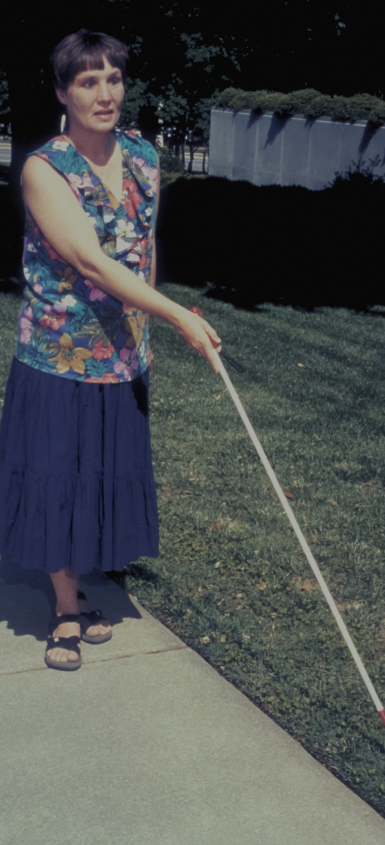
Katherine is a vibrant woman who was involved in an accident few years ago that made her lose vision in both eyes. Ever since then, Katherine has had to rely on digital devices and assistive technology to help her carry on with her life without little or no limitations. She recently injured her knee and has been going to the hospital for check-up with a knee replacement surgery due in a few months time.

Needs

  • Needs to be able to access information relating to her health easily.
  • Needs a way to hear the information in her health record.
  • Needs more applications that take tap gestures and haptic feedback into consideration.

Frustrations

  • Hates the inconvenience of depending on others to help with using applications.
  • Feels left out of the digital world when she can’t access information she needs like other people.
  • Feels like there’s little accessibility consideration made for people like her who also enjoy using digital technologies

10.  problem statement

Defining Problems using POVs

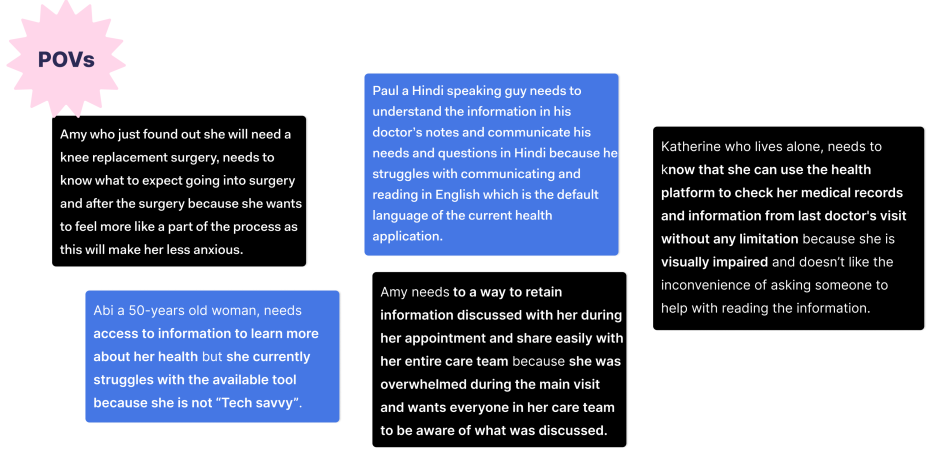
We wanted to ensure that in designing a solution and creating a meaningful experience for users, the design solution could serve as many people as possible without excluding certain user groups from experiencing our solution. To do this, we accounted for the case of extreme users interacting with our solution. What design decisions could we make to make their experience the same as that of our mainstream users?

Our extreme users include:

  • Users who are visually impaired: partial loss of vision, total loss of vision or color blind
  • Users who are not tech savvy: users who do not like to use digital technologies due the perceived complication around the use thereof
  • Users who are language impaired: cannot communicate or understand the default language of most applications which is usually English.
POVs 1

11.  ideate

Branching out Ideas using HMWs

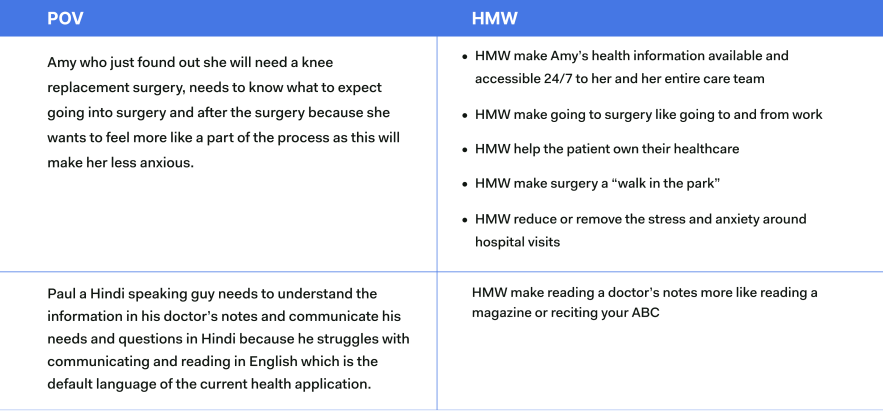
To help brainstorm ideas, we turned the POVs from the define stage into HMW statements and branched off ideas using the HMW questions.

POVs 2POVs 3

11.1  brainstorming

Ideas Brainstorming and Selection

After brainstorming ideas around the HMWs, we came up with three possible ideas for consideration. The ideas are:

  • A software/portal that can provide information such as a user portfolio, previous medical history, detailed notes on visits, tips and tricks for care and recovery, and a customer support chat
  • An app that allows people to be aware of which practice facility to go to depending on their situation (ER, urgent care, walk-in, etc.)
  • Doctor-patient simulator game that allows a visual experience for patients to understand how care may be given depending on the situation

11.2  ideas selected & decisions

We decided to go with Idea 1: the MyHealth app for the following reasons:

  • From talking to users, one major insight that kept re-occurring in every interview was a dearth of information. There was the concerning question of patients asking; so, what do I do? How do I know this about the healthcare system or my health condition? All of 29 | Page these showed that patients wanted to know things about their health, but the gap was in the lack of access to tools providing this information and no open direct line of communication with their doctors.
  • At the core, patients needed a health information system that was personalized to their individual needs and situations.
  • MyHealth was the closest we could get to help provide if not all the answers to patient’s concerns, but at least some while also giving them an open line of communication with their entire care team.

12.   storyboards

Highlighting Current User Experience using Storyboards

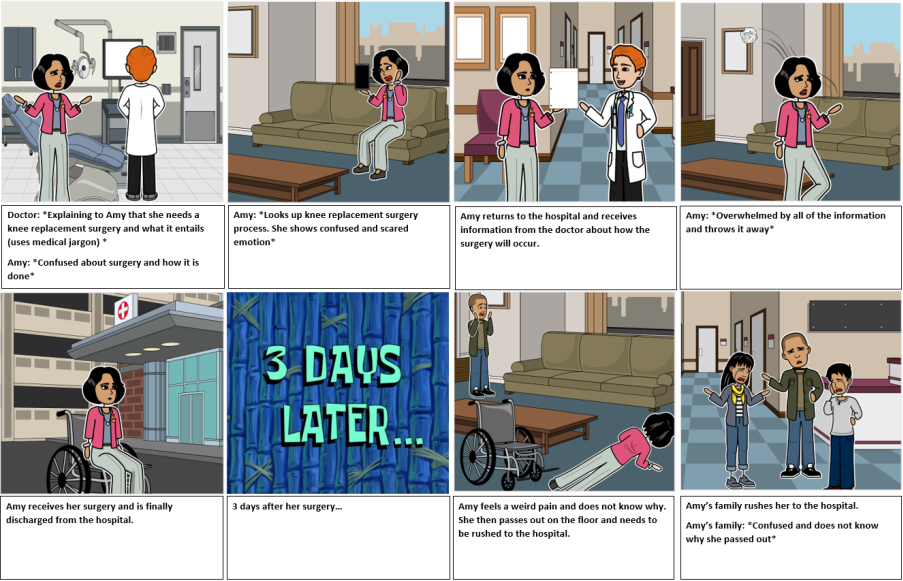
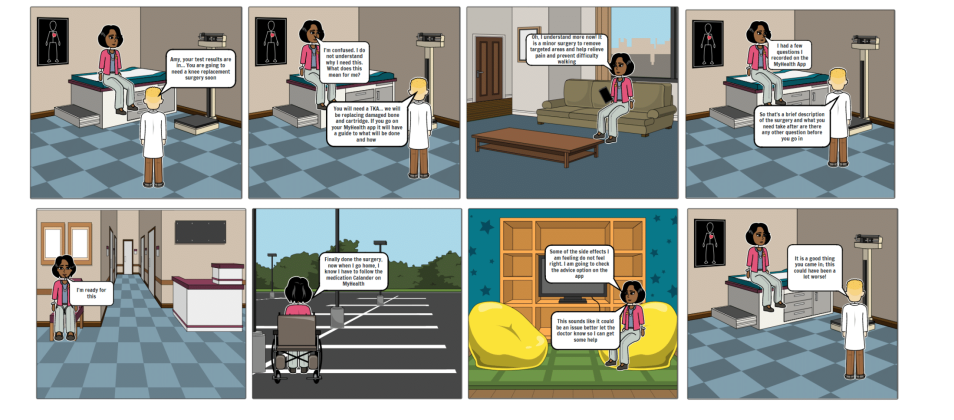
To help drive the design direction and highlight the various touch points in the user experience, we used storyboards as a form of prototyping and visualising what the new experience might look like

cartoon one
cartoon two

14.  PROTOTYPES - Round 1

Patient Onboarding

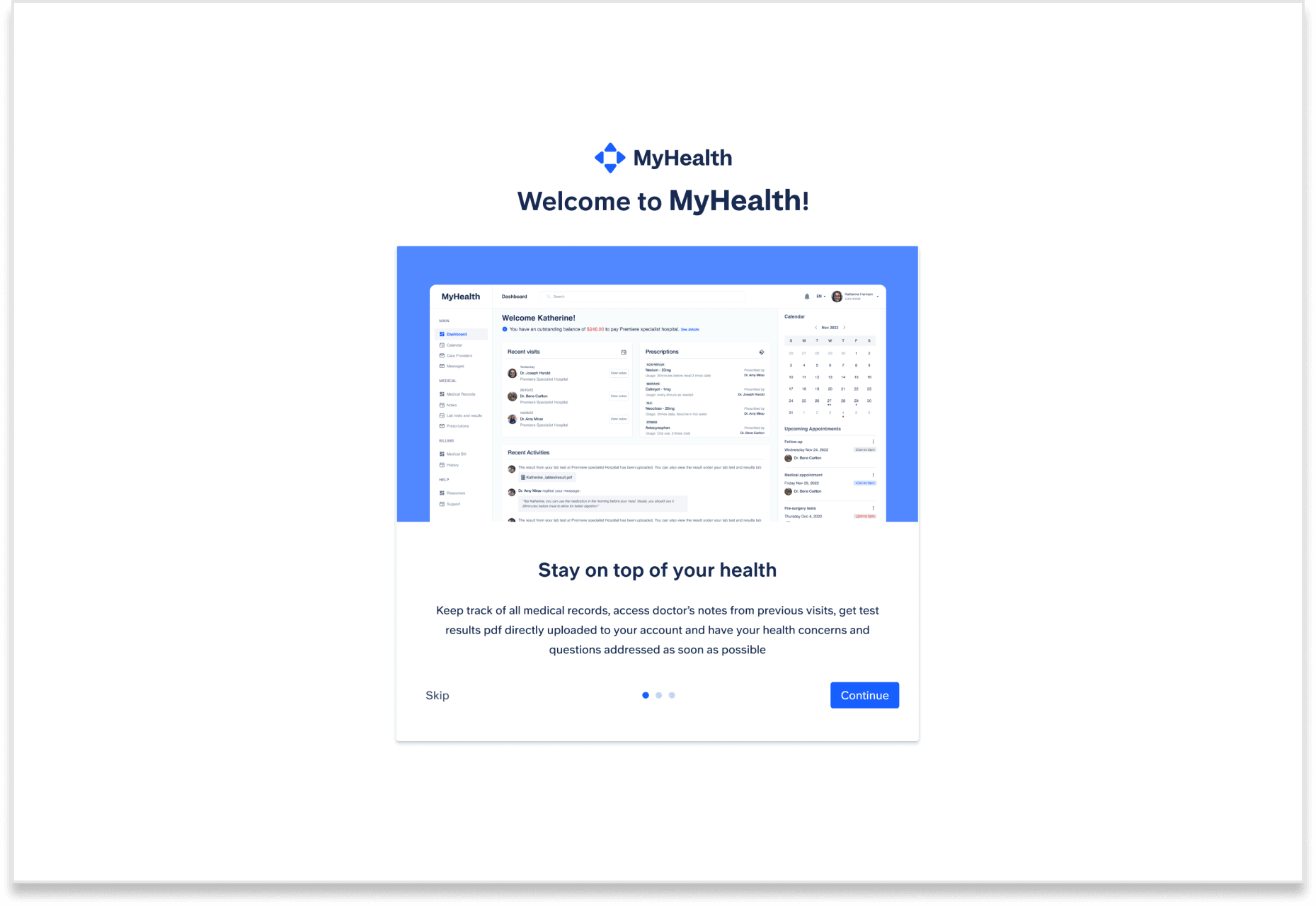
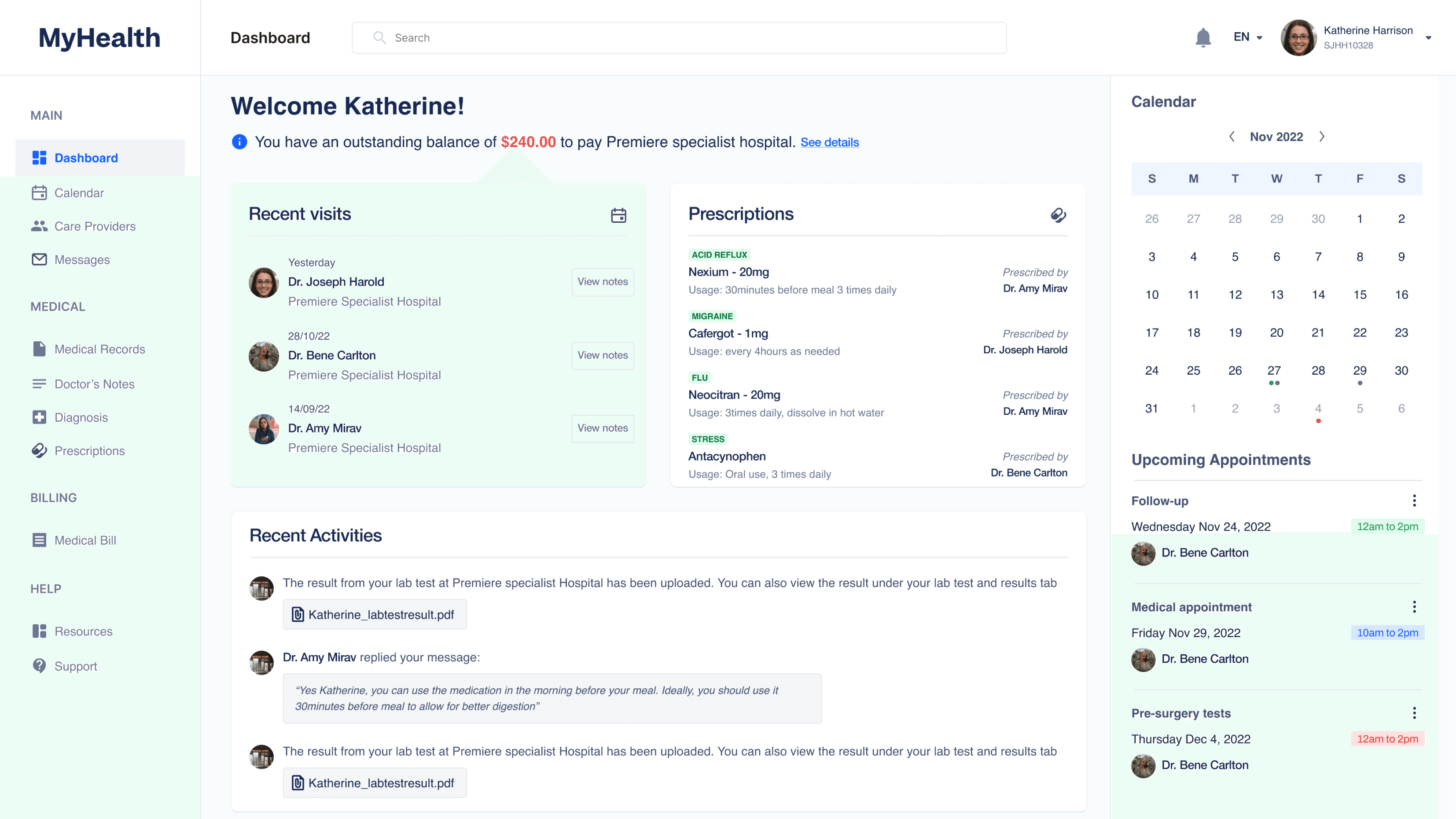
Onboarding Screen: serves to give users an understanding of what the web application is

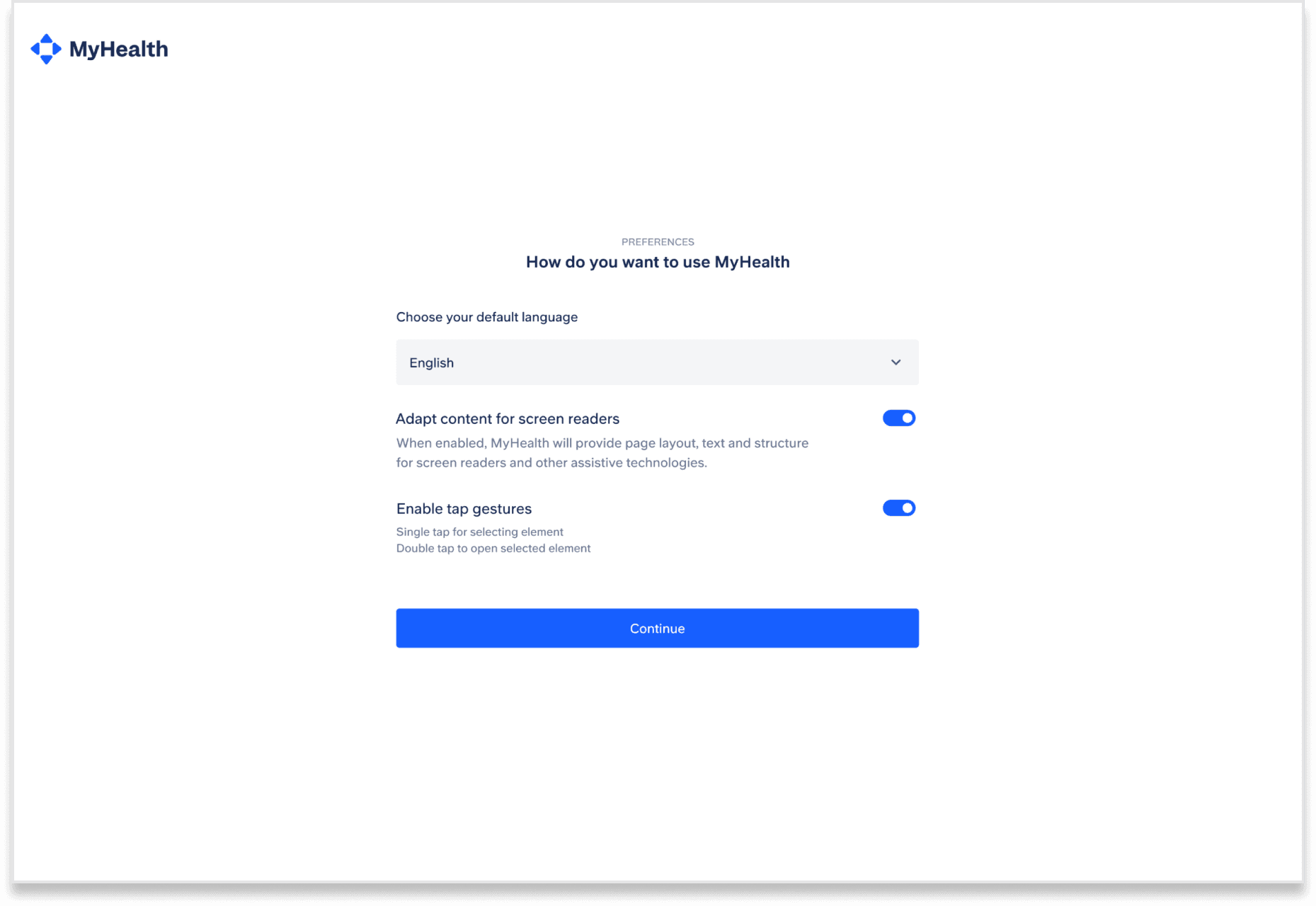
Preferences Onboarding Screen: serves to accommodate selected preferences patients might need, including those related to languages and enables the screen texts to be read out to

Dashboard

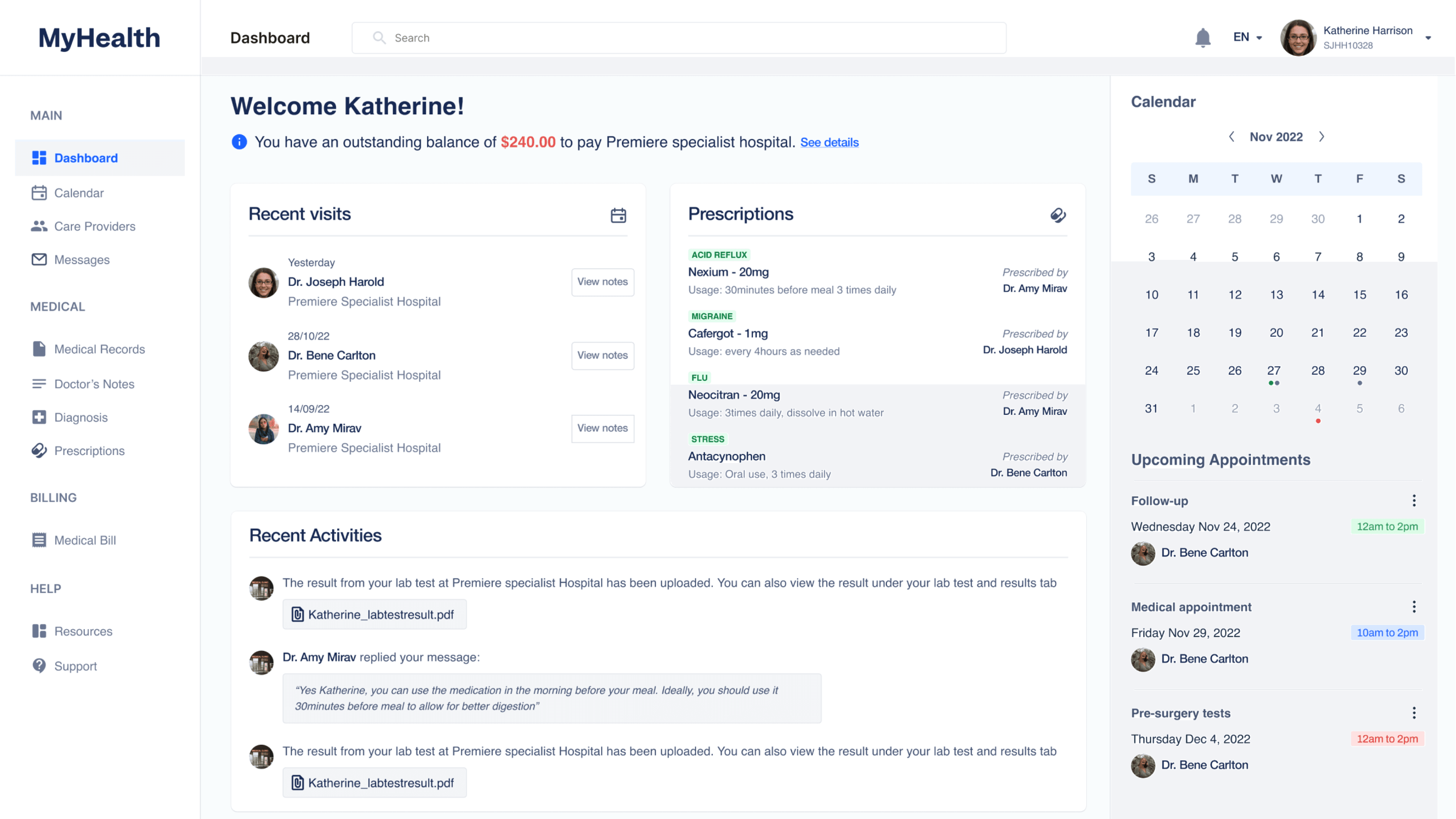
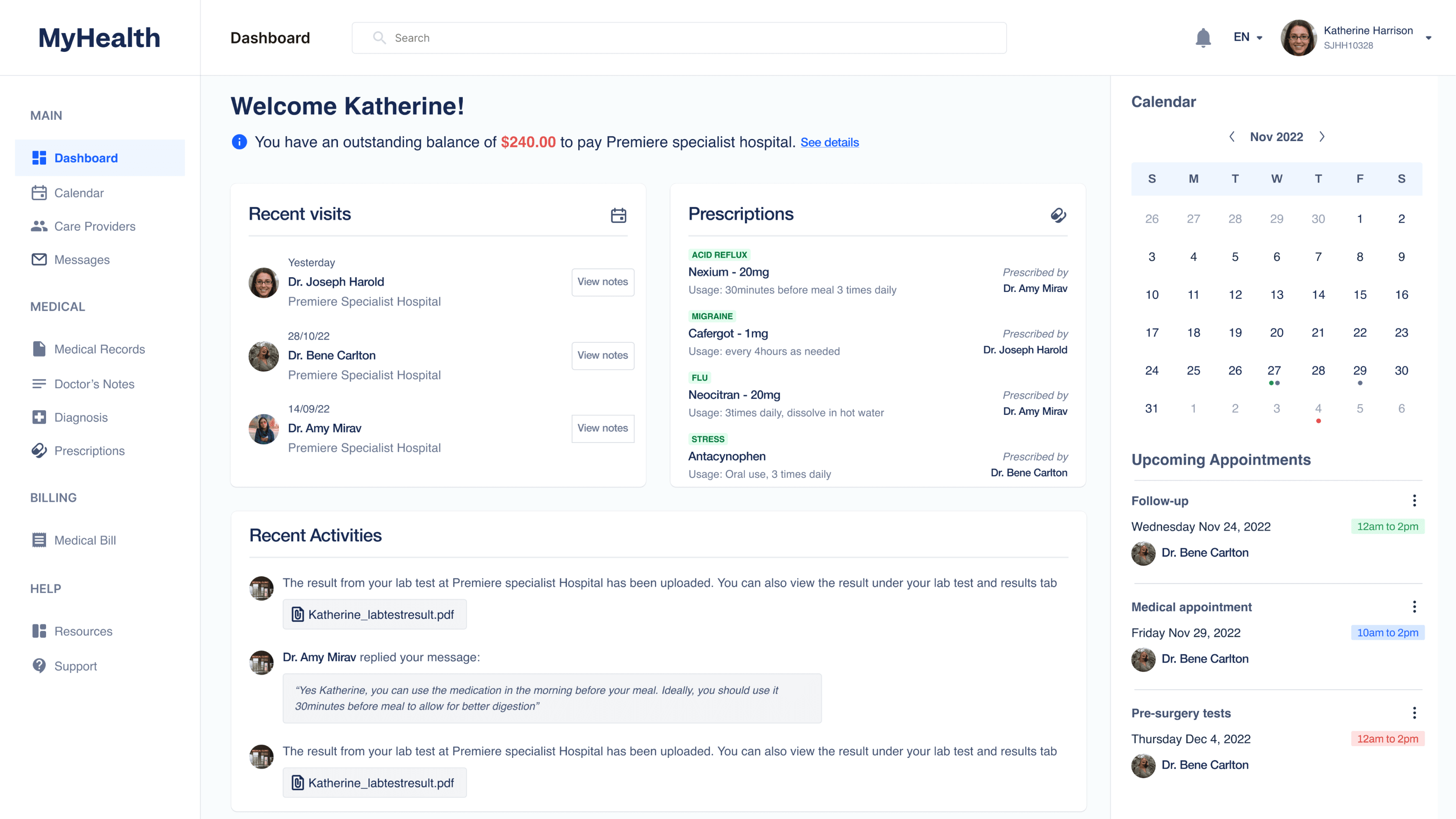
Home/Dashboard: this is the first landing page for patients which shows the most recent activities on their accounts, their prescriptions, recent doctor visits, attached notes, and a calendar to preview their appointments at a glanceers an understanding of what the web application is

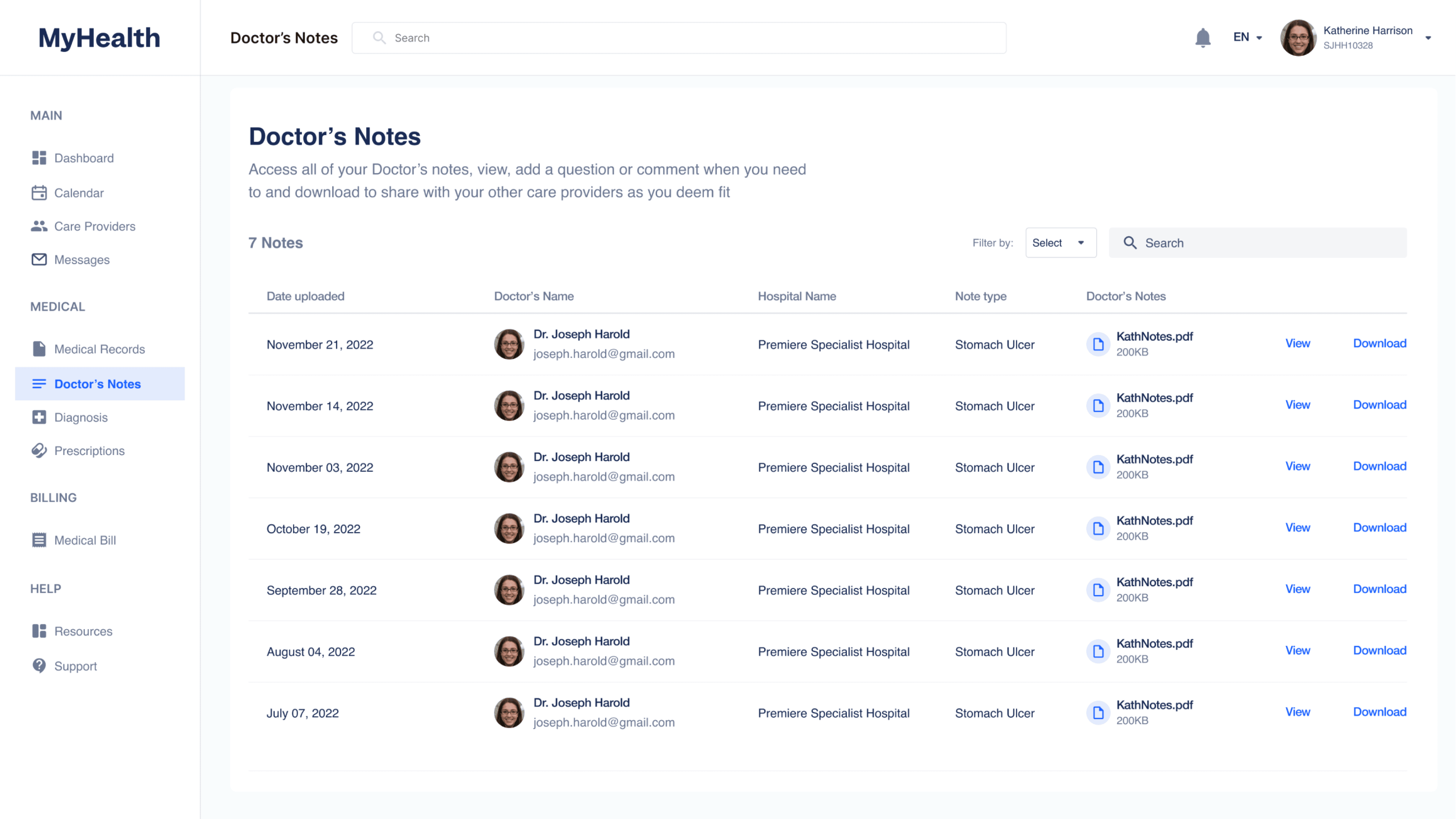
Doctor’s notes

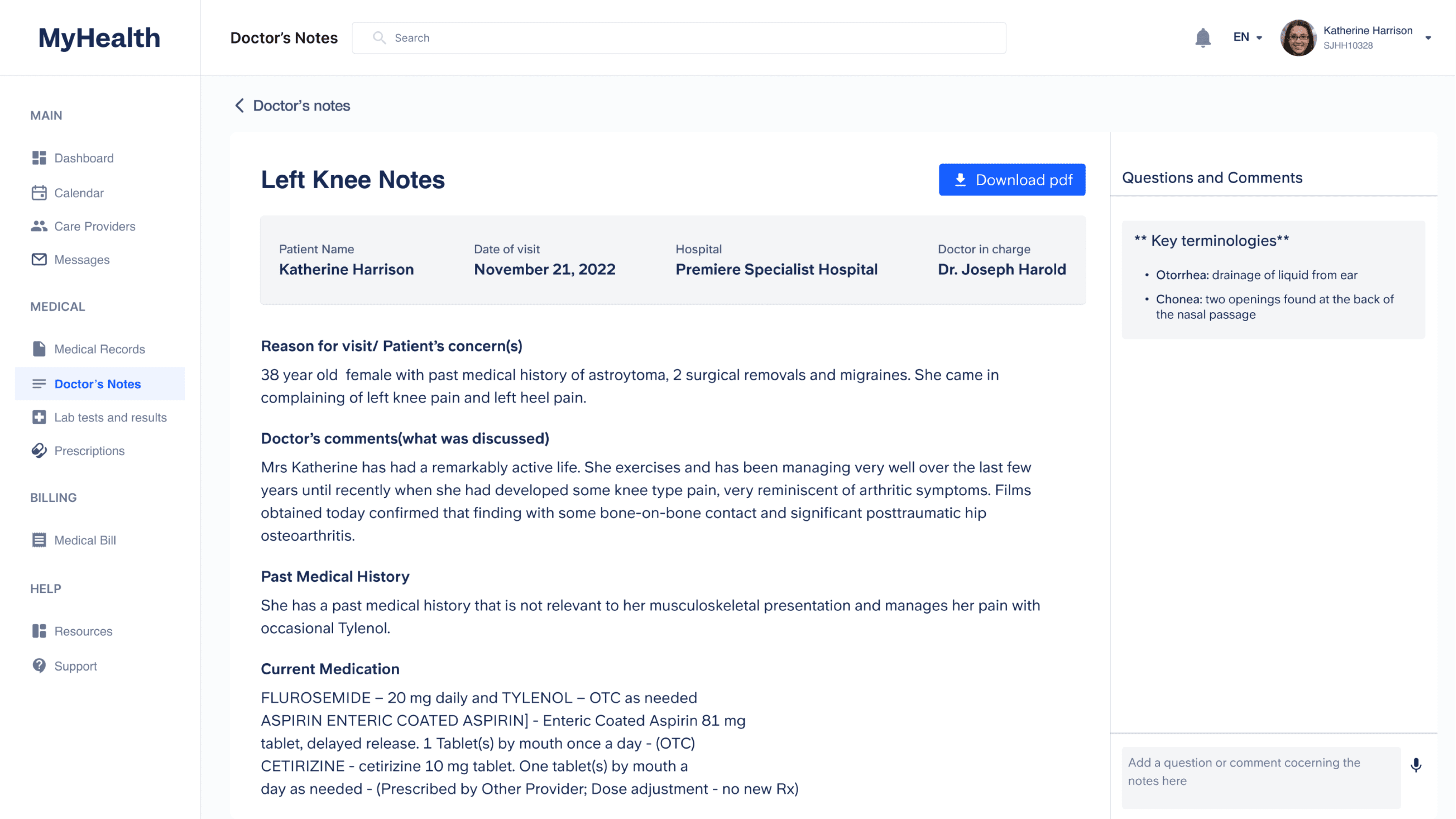
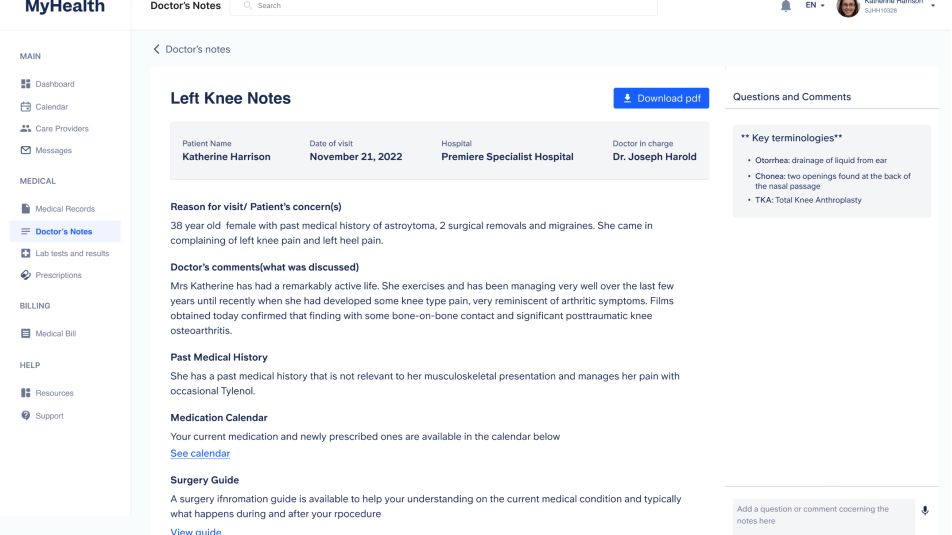
Doctor’s Notes: on selecting a doctor’s notes from the table of notes above (see the picture before), a user can view the detailed doctor’s notes from a visit. The doctor’s note includes information discussed during the patient’s visit, medications prescribed, and a comment section for patients to drop questions that might have after going through the notes they could not ask during the earlier visit.

15.  PROTOTYPE ITERATIONS

Insight Driving Iteration to Doctor’s Notes

We tested the first round of prototypes with Sahar and Debra. The feedback and insight gotten from the testing round required improvements to be made to the UI of the Doctor’s notes to make for a more meaningful experience for patients. The new insight that informed the new design is:

...Many patients do not know what to expect or what medications to discontinue or continue as well as symptoms to look out for post-surgery. Consequently, many patients tend to overlook symptoms that show up post-surgery which eventually cause more harm.

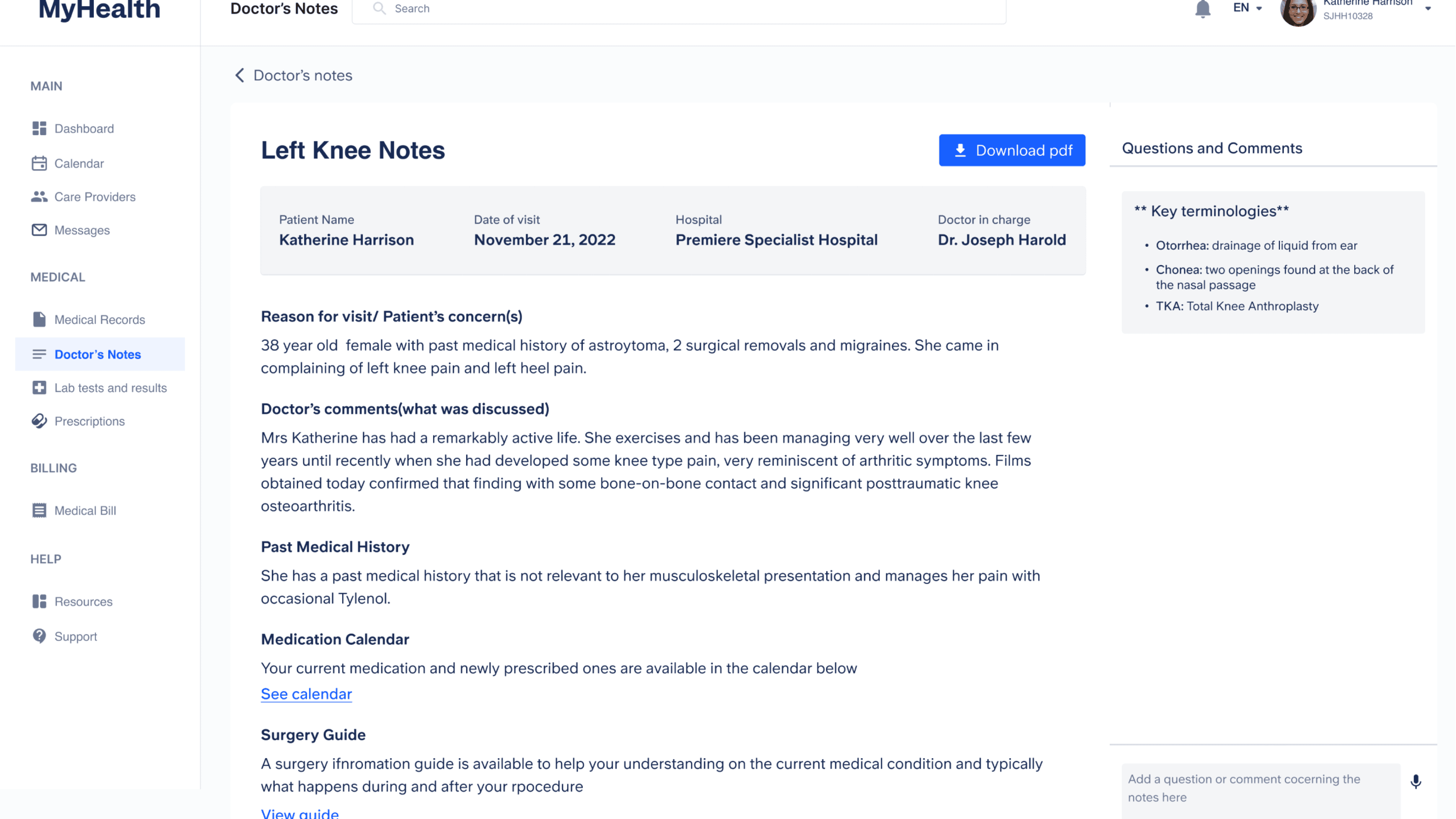
2 IMPROVEMENTS WERE MADE TO THE DOCTOR’S NOTES FEATURE

After:After the new insights we discovered, we redesigned the Current Medication section to be more detailed and presented the medication in form of a calendar with more visuals and use of plain, easy language to help patients understand what is to be done with each medication and what the medication looks like.

17.   USER TESTING

Feedback from User testing during Pilot

We tested the second round of prototypes again to seek feedback and validation

Some of the feedback received and suggestions include:

  • After testing the initial prototype with Sahar, she explained how we have managed to capture a lot of the features she had hoped Dovetail would have provided but fell short on.
  • Sahar had a positive reaction to the guide for the software (helping onboard inexperienced users in getting familiar with the app) and verified that the service would be able to be translated into multiple languages.
  • Suggested to use of symbols to remind patients when to take their meds, for example, a sun rising in the morning, and a moon for the night. She explained that being able to have your medication schedule easily laid out like this for the patient, especially one that just came out of surgery, helps prevent confusion and ensure that they follow what they need to. After surgery, there are wait periods for taking some medication and others need to be taken in infrequent periods.
  • People are given papers for everything they must take and what they are supposed to do, and this can result in a lack of information being retained and issues with the patient. Having a detailed list of key steps and medications will help, also a list of potential signs to watch out for such as blood clots. Creating a single platform that allows for all of this will be a useful tool for patients, especially for surgeries, and can raise awareness of post-surgery risks.

17.  FINAL PROTOTYPE

The final prototype was improved to include a patient information guide for surgery and an AR Interactive Wayfinder to ease anxiety on the day of.

Improved Doctor’s notes

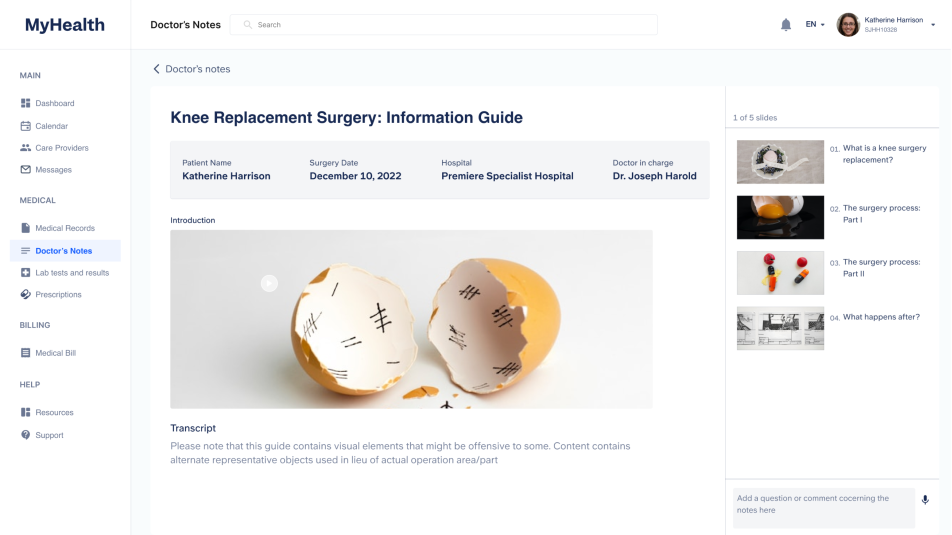
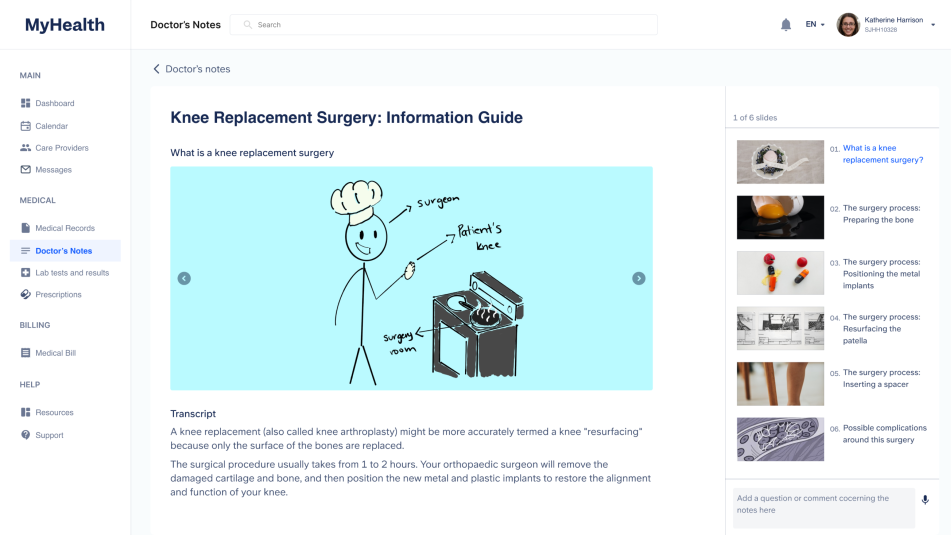
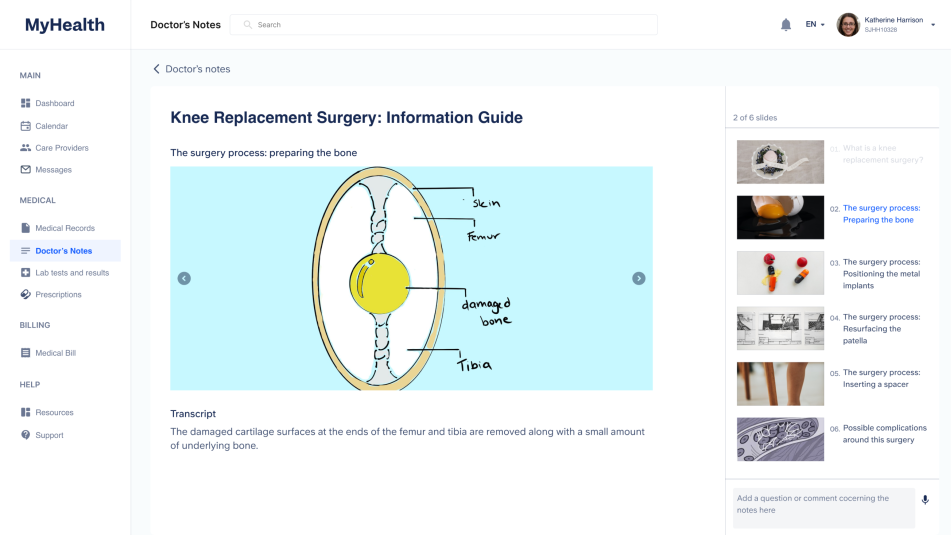
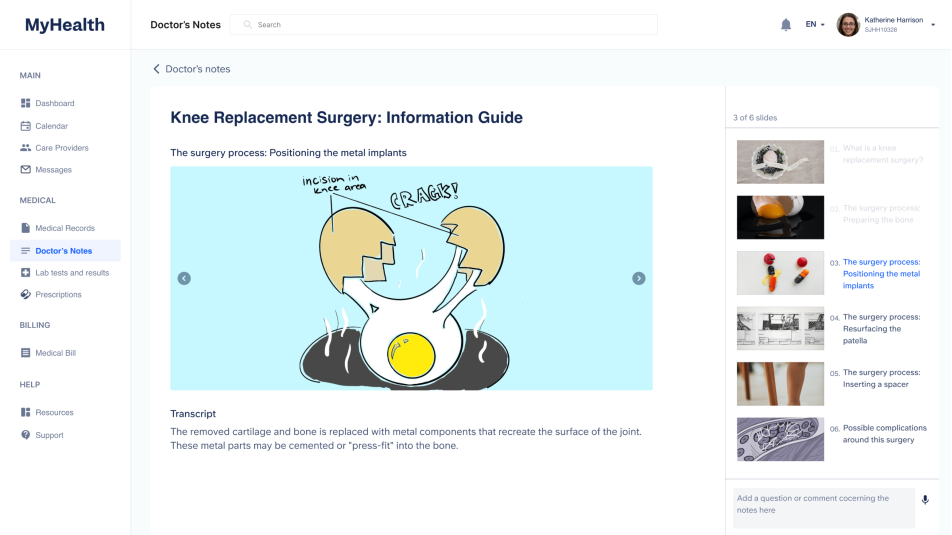
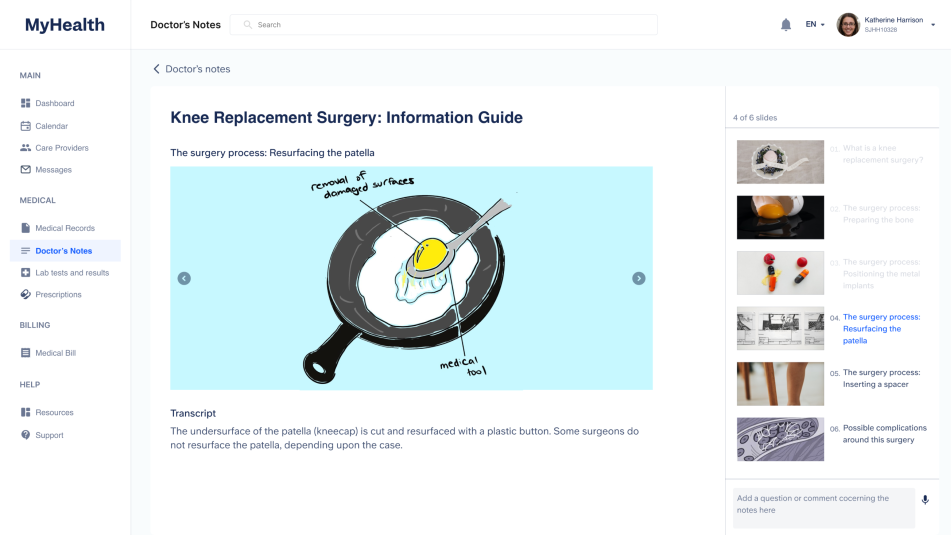
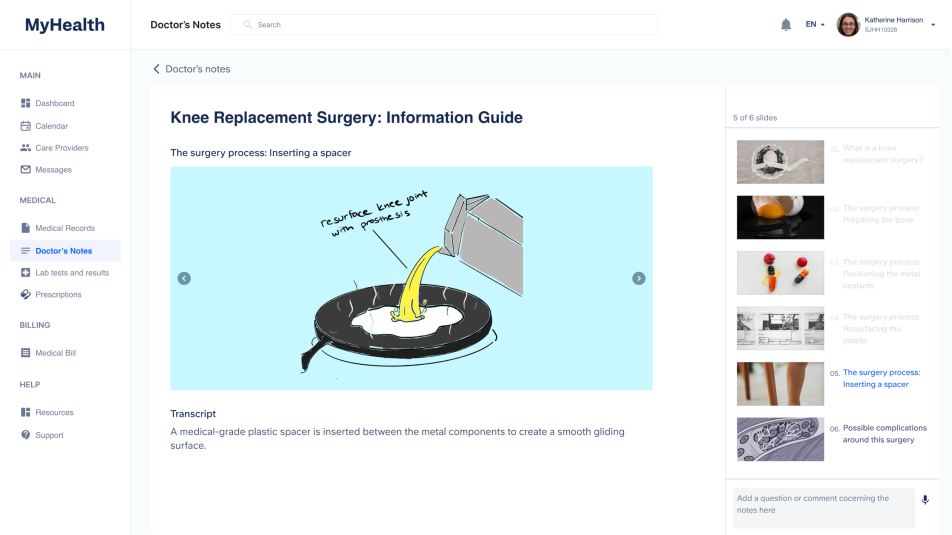
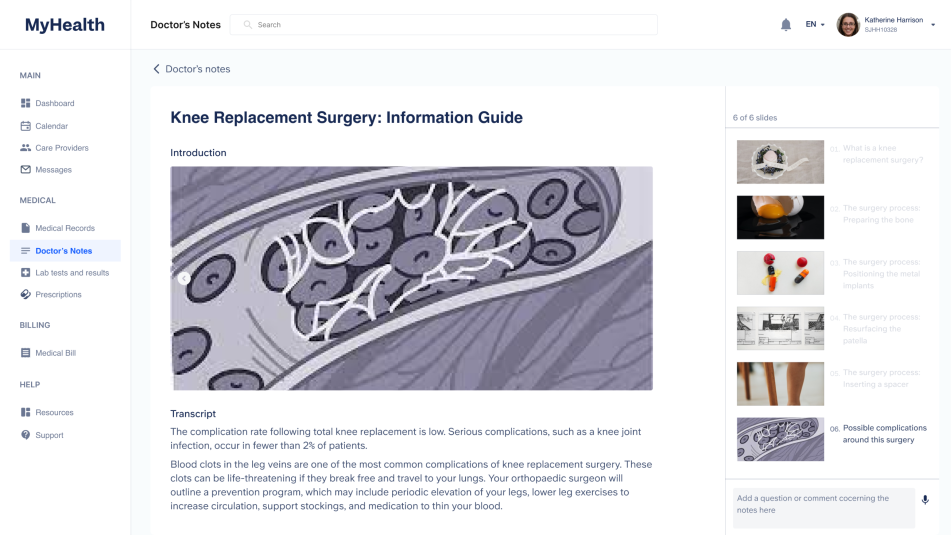
Doctor’s notes: After the new insights we discovered, we redesigned the doctor’s notes page to include a customisable surgery information guide that helps patients understand what happens during a typical surgery, in this case, knee replacement surgery, and the next steps after their procedure.

Pre-surgery guide

Pre-surgery guide: This guide helps patients be expert about their health; particularly when they have an upcoming surgery. This guide aims to detail to the patient what typically happens during the surgery. That way, patients understand fully well what happens going into surgery.
The guide employ the use of objects as an alternative representation of body part so patients aren’t terrified with the visual representation of the guide. The guide can be further improved by detailing how Doctors prepare for a patient’s surgery; to further instil a sense of trust between the patient and the care team.

AR Interactive Wayfinder

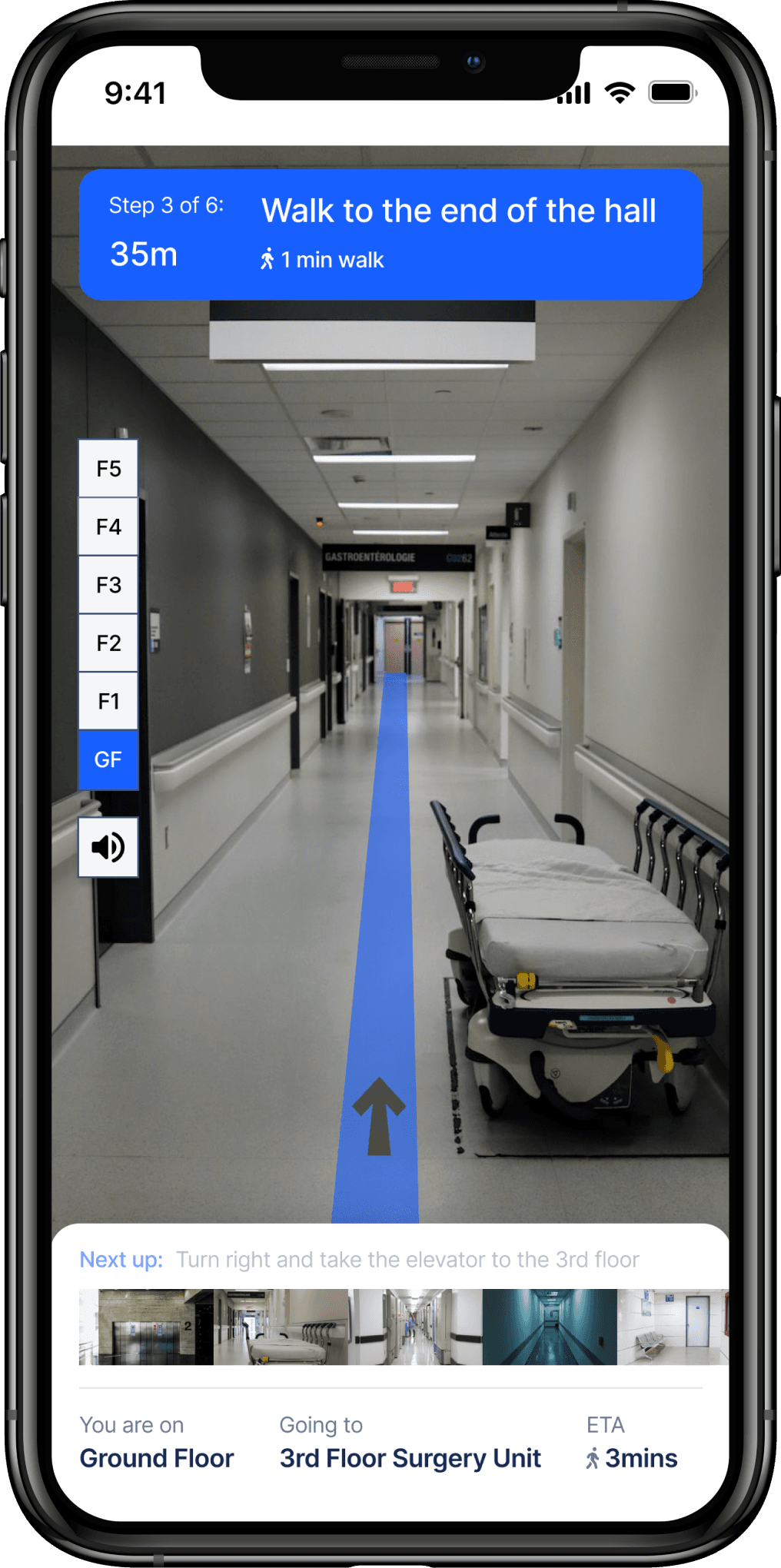
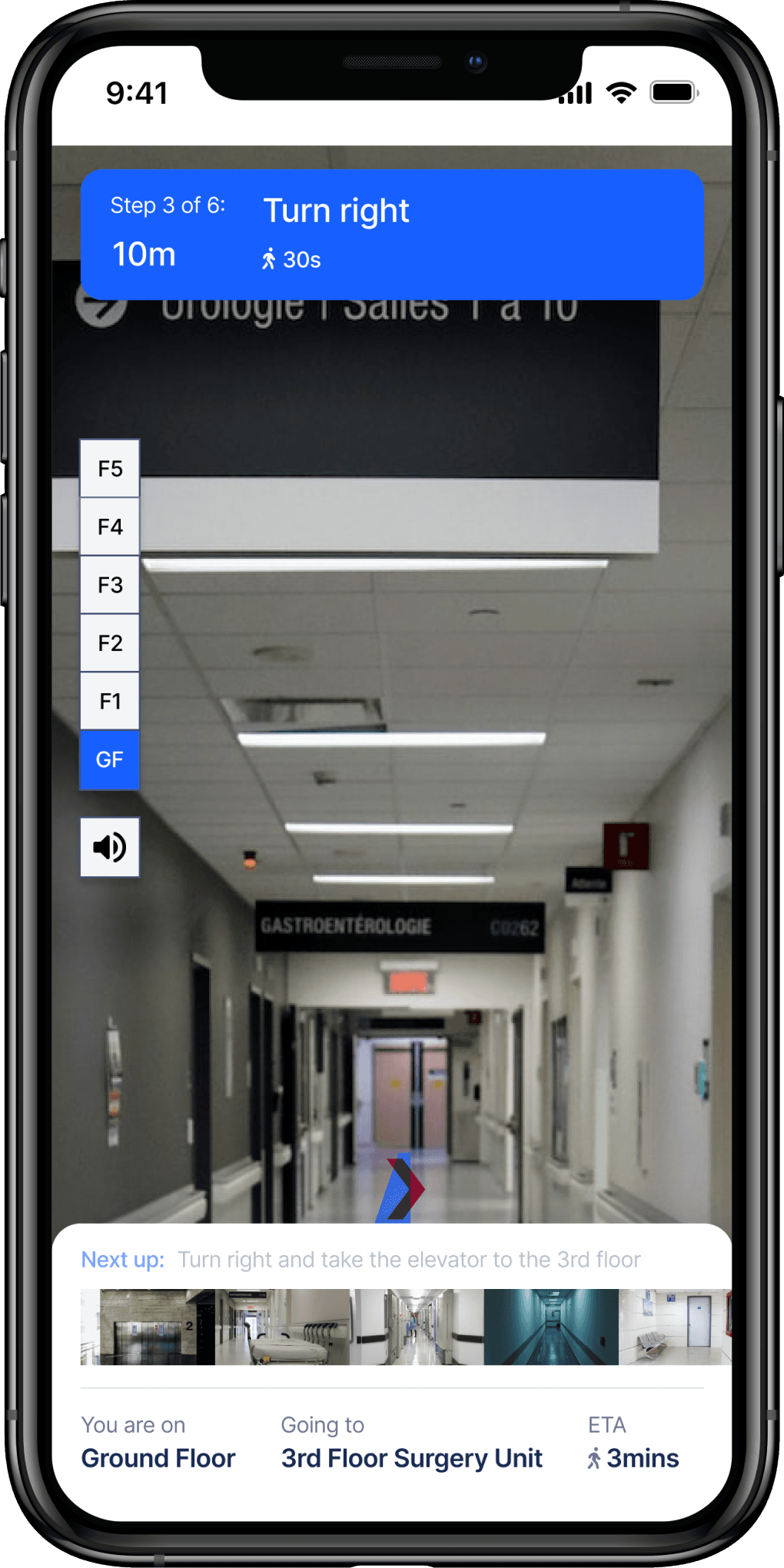
This serves as a hospital indoor map using real scenarios and pictures of the hospital layout to help patients find their way around the hospital, especially on the day of their surgery appointment and even regular visits. This is an approach to helping patients feel more in control. Moreso, the hospital should not feel like a maze to patients as this will only make already anxious patients even more anxious. The highlighted blue area shows the path to walk through, the flashing arrow uides users marking out walk path, turning directions, and doors/elevators to go through.

The highlighted blue area shows the path to walk through, the flashing arrow uides users marking out walk path, turning directions, and doors/elevators to go through.

18.   DESIGN SPEAKING PRESENTATIONS

Usability Testing with Sahar

Here’s some feedback from the usability testing with Sahar

“... there’s this aftercare summary piece that is missing. I want a summary; this is the aftercare summary I would love. I love this idea, but the one challenging piece is getting the medical professionals onboard to use it. But i think it’s too valuable for them to not buy into this because it is an incredibly valuable tool you are proposing. Especially the key terminology - I think that’s brilliant.” Sahar
  • Sahar felt comfortable walking through the prototype. She particularly liked the terminologies section included in the doctor's notes. She thought it was a good way to help patients and doctors clarify meanings of terminologies and acronyms used during conversations.
  • The Medication calendar feature also stood out to her. It was easy for her to read and understand what each medication was. She mentioned that the use of plain language was helpful to her and reckons it will be helpful for people with language barriers so they can easily copy the words and get the verbatim translation in a translation tool.
  • She also mentioned was the visual display and short description of what each medication looked like. Seeing that, she thought it would give her a thorougha differentiation between all the medications she had to use. She nodded her head at intervals when she understood what was on each screen on the prototype.

19.  DID I WIN SOMETHING?

Project Reflection

From testing with Sahar, I learned that seeking out feedback early was immensely helpful in helping to decide if we were on the right path and more importantly if we were designing a meaningful experience for patients by addressing a concern.

01.  Don’t get attached to a solution

In interviewing and iterating through prototypes, I learned that being data driven is necessary in making creative decisions and producing a viable solution. Consequently, a designer should always be open to iterate through several prototype to get to the final deliverable.

02.  Existing market provide valuable insights

Interviewing patients that have used the existing solutions helped provide a better understanding of the barriers they have faced so far, what positives and negatives they have seen, and tools that they feel are missing or under-utilised.